


Mp4 to Mp3 - Convert Video to
4.6449.00 Reviews
App Specs
- Version
- 1.5.5.4
- Updated On
- License
- Free
- Downloads
- 1,000,000+
- Developer
- HGPUBLISHING LIMITED
- Categories
- Video Players & Editors
- Platform
- Android
Screenshots
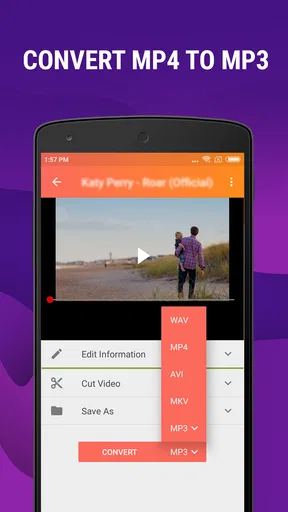
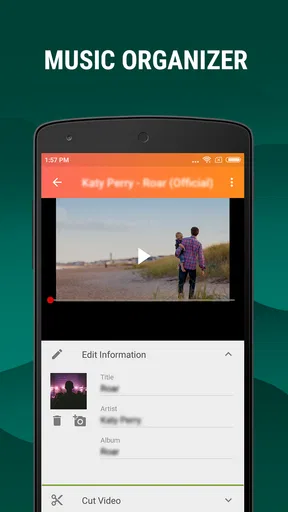
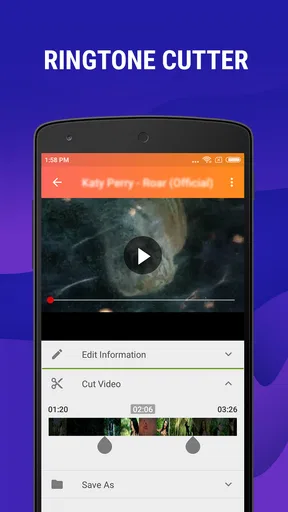
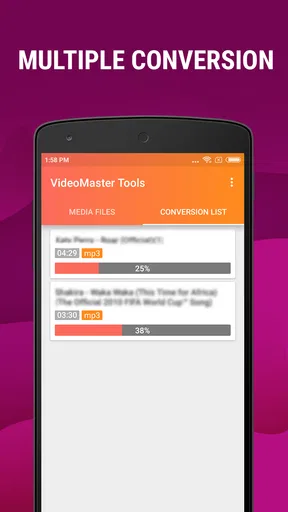
 Analysis by AppCompare
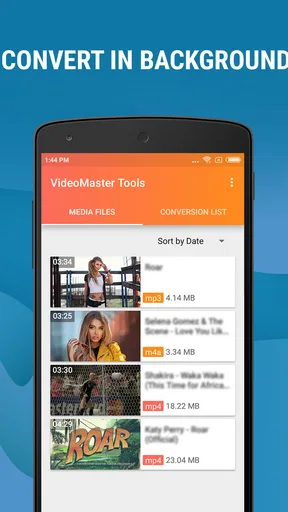
I tested Mp4 to Mp3 - Convert Video to as a practical audio tool rather than treating it like a full editing studio. That distinction matters. This is an Android app in the video players and editors category, built around a focused task: turning compatible video or audio files into MP3 or M4A files, trimming a ringtone, and keeping converted music easier to organize. I found it most useful when I needed a quick result on the phone, without opening a desktop editor or learning a complicated timeline.
The app is free to install and suitable for Everyone, which makes it approachable on a shared household device. HGPUBLISHING LIMITED is the developer, and the app has reached over a million installs with a 4.6 average from around twelve thousand ratings. Those figures suggest that its straightforward purpose appeals to many Android users, but they should not be mistaken for proof that it replaces a complete media-management system. My experience was better when I treated it as a small conversion utility with a few helpful extras.
How it fits into a shared household device
A realistic use case is a family tablet or spare Android phone used by several people. One person may have a video containing a speech, rehearsal, interview, or personal recording and want an audio copy for offline listening. Another may need a short ringtone from a legally owned file. Instead of passing the device between several complex apps, this converter gives the household one clear place to perform that job.
I especially liked the simple division between the source file and the finished audio. A user does not need to understand codecs, audio containers, or a professional editing workflow to begin. The central idea is easy to explain to another person: choose a compatible file, select the desired audio output, trim if needed, and organize the result. That makes it less intimidating for someone who rarely edits media.
There is also a useful household advantage in keeping the task local to the device. If a family member is preparing an audio clip for a commute or making a short ringtone, the workflow does not require sending the original recording to another person first. I would still remind everyone to work only with files they are allowed to copy or convert. The app’s convenience does not change copyright or ownership rules.
The main limitation of shared use is that the app is not a family library or a multi-user account system. I did not approach it as a place to separate everyone’s personal collections automatically. If several people use the same phone, naming files clearly becomes important. A vague output name can quickly become confusing when one person’s music, another person’s school recording, and a third person’s ringtone all sit in the same storage area.
What the first setup feels like
The initial experience is refreshingly narrow. Rather than presenting a crowded dashboard of effects, publishing tools, and social options, the app points toward conversion. That is a strength for occasional users. I could focus on the file I wanted instead of sorting through features that had nothing to do with the immediate task.
Worth Reading Before You Choose

EA SPORTS FC Mobile 26 Is a Bigger Football Game, but It Takes Time

Flipboard Shows What News Apps Must Do Beyond the Feed

Switching to Android Auto Means Rethinking Your Driving Routine

Google Calendar Makes a Crowded Week Easier to Manage

Ludo King Makes the Most of the Minutes Between Plans

Baby Panda World Brings Quick Play to Modern Phones, but Its Game Library Feels Busy
Before handing the device to another household member, I would establish a simple routine: keep original videos in one location, save converted audio with a recognizable name, and remove temporary files after checking the result. This is not a special feature of the app; it is the practical boundary that keeps a shared device manageable. The converter can make new files quickly, so storage can become untidy if nobody decides where those files belong.
The app runs on Android seven point zero and later, so compatibility is broad enough for many older devices still used around the home. Its current version is 1.5.5.4. I would still check the device’s available storage before converting longer recordings, especially on an older phone with limited space. Conversion creates another file rather than magically replacing the original, and that distinction is easy to overlook.
Because the app is free, it is easy to try without committing money at the start. There are in-app purchases ranging from $6.49 to $29.99 per item, so I would pay attention to any purchase screen before confirming an upgrade or optional feature. On a shared device, that matters even more: a child or guest should not be left to navigate purchase decisions without the account holder present.
Coordinating files when more than one person uses the app
The most effective coordination method I found was to agree on a naming pattern before converting anything. For example, a household could use the subject followed by the date or occasion, then add a short label such as “ringtone” or “listen.” This small habit is more valuable than it sounds because the app’s purpose encourages repeated, quick conversions. Without a naming rule, the output folder can become a pile of nearly identical files.
I also recommend listening to the beginning and end of every trimmed clip before treating it as finished. A ringtone or spoken extract can sound acceptable in the middle but begin too abruptly or end with an unwanted fragment. The cutter is useful for selecting a section, but it does not replace human checking. I found that a few seconds of playback saved more frustration than repeatedly guessing at the correct start and stop points.
A second non-obvious workflow is to keep a master copy of an important source file separate from the converted result. If someone later wants a different section or a different output format, the original gives them something to work from. Converting an already converted file can produce a less flexible starting point and may make it harder to recover the full-quality source. For family recordings, school projects, or personal interviews, I would never treat the MP3 as the only copy.
The music organizer is helpful for basic tidiness, but I would not confuse it with a full streaming library or a sophisticated tagging application. It can make the results easier to find, yet household coordination still depends on sensible folders and names. If you already maintain a large collection with detailed artwork, playlists, synchronized metadata, and multiple devices, a dedicated music manager will probably remain the better central system.
Age, trust, and sensible boundaries
The Everyone age rating fits the app’s basic purpose and uncomplicated presentation. A young person could understand the conversion idea, but that does not mean every conversion should be unsupervised. The important boundary is not the button itself; it is the content being copied, the files being shared, and any purchase screen that might appear.
On a family phone, I would show younger users how to select their own permitted recordings and how to recognize the finished file. I would also explain that converting a video does not grant permission to redistribute its audio. That conversation is particularly relevant when a child wants a song as a ringtone or wants to extract audio from an online clip. The app makes the technical step easy, so the household needs to supply the judgment around it.
Trust also includes privacy. A private voice recording, family video, or school project may contain information that should not be passed around casually. Since the app is designed to work with personal media, I would encourage users to review the source before sharing the output. A short audio file can still reveal names, conversations, locations, or other details that were less obvious in the original video context.
For teenagers and adults, the app is a convenient way to prepare a personal audio file without giving access to a larger editing suite. For younger children, I would keep the process supervised, especially on a device connected to a purchasing account. The Everyone rating tells me the general content is appropriate, but it does not replace household rules about ownership, privacy, and spending.
Where the converter is genuinely useful
The strongest use case is a one-off conversion. Imagine a family member records a short presentation as a video but wants to listen to the spoken content while walking. The app can turn that material into an audio file that is easier to play without the visual portion. In this situation, the narrow feature set works in its favor: there is no need to learn multitrack editing, add transitions, or export a finished video.
Another good use is creating a short personal ringtone from a permitted recording. The cutter gives the user control over the part that matters, which is more practical than assigning an entire long recording as a ringtone. I would choose a section with a clear opening and enough volume, then test it in the phone’s ringtone settings. The app prepares the clip, but the final test belongs on the device where it will actually be heard.
It can also help when a household has older media that is awkward to play in its original form. Extracting audio from a compatible MP4 may make a lecture, rehearsal, or spoken note easier to keep in a music-oriented folder. This is a specific strength: the app reduces the distance between a video file and an audio-only listening habit.
One practical tip is to avoid converting every file automatically. Video may contain visual information that is essential, and audio-only output can remove context, captions, demonstrations, or nonverbal cues. I would convert only when the listener truly benefits from audio. That keeps storage cleaner and prevents a household collection from filling with duplicates that nobody uses.
What it does better than usual alternatives
Compared with a desktop editor, this app is faster to approach for a small job. A computer program may offer more control over bitrate, filters, normalization, multitrack mixing, and batch processing, but that power comes with more decisions. For a person standing in the kitchen trying to make a short personal clip, a phone-based converter is often the more sensible choice.
Compared with a general file manager, the dedicated cutter and conversion workflow are more direct. A file manager can move or rename media, but it normally does not provide the same focused path from video to audio. The organizer also gives the app a useful role after conversion, even though it does not turn the phone into a complete music-management platform.
Compared with online conversion websites, a local app can feel more convenient for files already stored on the phone. I prefer not to upload a private family recording merely to extract its audio. That said, I would not make a broad claim that every local workflow is automatically private or risk-free; users should still review the app’s current behavior and permissions on their own device. The practical advantage is that the job begins with local media instead of requiring a browser upload routine.
Dedicated audio editors remain the better choice when precision matters. If I need detailed waveform work, noise reduction, volume balancing, multiple tracks, or a carefully mastered result, I would move to a more advanced tool. This converter is intentionally less ambitious. Its value comes from removing unnecessary steps, not from matching a studio application.
Friction points worth knowing before relying on it
The app’s simplicity can become a limitation for demanding projects. A user looking for elaborate editing controls may quickly reach the edge of what this tool is comfortable doing. The store summary points toward conversion, ringtone cutting, and organization, and that is exactly how I would frame its role. I would not install it expecting a complete video editor or a professional audio workstation.
Output quality also deserves a thoughtful approach. MP3 is convenient and widely compatible, but converting a compressed source into another compressed format cannot restore detail that was already lost. For casual listening, a ringtone, or spoken material, that trade-off may be perfectly acceptable. For music archiving, I would preserve the original and avoid treating a converted MP3 as a high-quality master.
Household use introduces another possible annoyance: duplicated files. If two people convert the same video in different sessions, the device may end up with several versions that look similar. I would add a quick review step after each job and delete only the copies that are clearly unnecessary. That is especially important when the source is a long video and the output occupies additional storage.
The purchase range is another reason I would keep the account owner involved. The app is free, but optional paid items can change the experience depending on what a user chooses. On a personal phone, that is a straightforward decision. On a shared tablet, I would make the rule explicit: nobody confirms a purchase without asking the person responsible for the account.
Who should install it and who should choose something else
I would recommend it to Android users who regularly need quick MP4-to-audio conversion, occasional M4A output, short ringtone clips, or a basic way to keep converted music together. It is also a good fit for households where several people need the same simple workflow and nobody wants to maintain a desktop editor for occasional tasks.
I would skip it if my main goal were advanced audio production, detailed restoration, or a large synchronized collection. In those cases, a dedicated editor or music-management system would offer better control and a more durable workflow. I would also look elsewhere if I needed a tool designed around multiple personal accounts, because this app should not be mistaken for a household profile manager.
For users who mostly work with online media rather than files already saved on the phone, the first step may be less convenient than expected. The app is most natural when the source is available locally and legally. It is not a substitute for obtaining media properly, and it should not be used as a shortcut around a service’s terms or a creator’s rights.
My household verdict
After using it, I see Mp4 to Mp3 - Convert Video to as a focused utility that earns its place through convenience. The converter, ringtone cutter, and organizer cover a useful group of everyday jobs without forcing a shared-device user into a professional editing workflow. Its broad Android compatibility and Everyone rating make it approachable, while the free starting point lowers the barrier to trying it.
My recommendation comes with clear boundaries: keep originals, name outputs carefully, check trimmed clips, supervise younger users, and treat purchases as an account-owner decision. Those habits matter because the app makes media conversion quick, not because it provides household administration tools. Used thoughtfully, it can save time when a family member needs an audio-only copy or a short personal ringtone.
The final decision is simple. Choose it when speed and basic conversion matter more than deep control. Choose a fuller editor when precision, restoration, or complex projects are the priority. For a shared Android device and ordinary personal media tasks, I found it practical and easy to explain, with limitations that are clear enough to manage. Its best quality is not the number of features, but how quickly it gets a small audio job out of the way.
Pros
- Converts MP4 videos to MP3 audio quickly on most devices.
- Supports extracting audio from videos stored in your phone’s gallery.
- Simple interface makes basic conversions easy for first-time users.
- Useful for creating audio files from personal video recordings.
- Converted files can be played with most standard music players.
Cons
- Output quality and format options may be limited in the free version.
- Large videos can take noticeable time and storage during conversion.
- May include ads that interrupt the conversion workflow.
- Requires storage access to import videos and save converted audio.
- Privacy depends on whether processing occurs locally or online.
FAQs for Mp4 to Mp3 - Convert Video to
What is Mp4 to Mp3 - Convert Video to?
Mp4 to Mp3 - Convert Video to is a media conversion app designed to extract audio from video files and save it in MP3 format. After selecting a compatible video from your device, you can usually choose an output quality and begin the conversion. It is useful for creating audio-only files from personal recordings, downloaded videos, lectures, interviews, or other content you are legally allowed to convert.
How do I convert an MP4 video into an MP3 file?
Open the app and grant the requested access to your device’s media files. Select the MP4 video you want to process, review the available audio settings, and start the conversion. Depending on the video length and your phone’s performance, the process may take a few seconds or several minutes. Once finished, the MP3 should be available in the app’s output folder or sharing menu.
Does Mp4 to Mp3 - Convert Video to support other video formats?
The app is primarily intended for converting MP4 videos into MP3 audio, although support for additional formats may vary according to the installed version and device. Before downloading, check the application listing or the format options shown inside the app. If a file cannot be imported, it may use an unsupported codec, be damaged, be protected, or require conversion to a compatible video format first.
Can I choose the MP3 quality and where the converted file is saved?
Many conversion tools provide options such as bitrate, audio quality, file name, and destination folder, but the exact controls can differ between versions. Higher bitrates may preserve more detail while producing larger files, whereas lower settings save storage space. After conversion, check the app’s file list, your device’s music or downloads folder, and the sharing options to locate the finished MP3.
Is it safe and legal to convert videos with this app?
The app itself can be useful for converting personal videos or material for which you have permission, but copyright rules still apply. Avoid extracting audio from protected movies, music videos, or streaming services unless the owner or applicable law permits it. Also review the permissions requested by the app and avoid importing private material if you are uncomfortable with its privacy practices or storage behavior.


